Request DeadEye™ Access
DeadEye™ is distributed by request. Tell us who you are and what you intend to use it for, and we will follow up with build availability and terms.
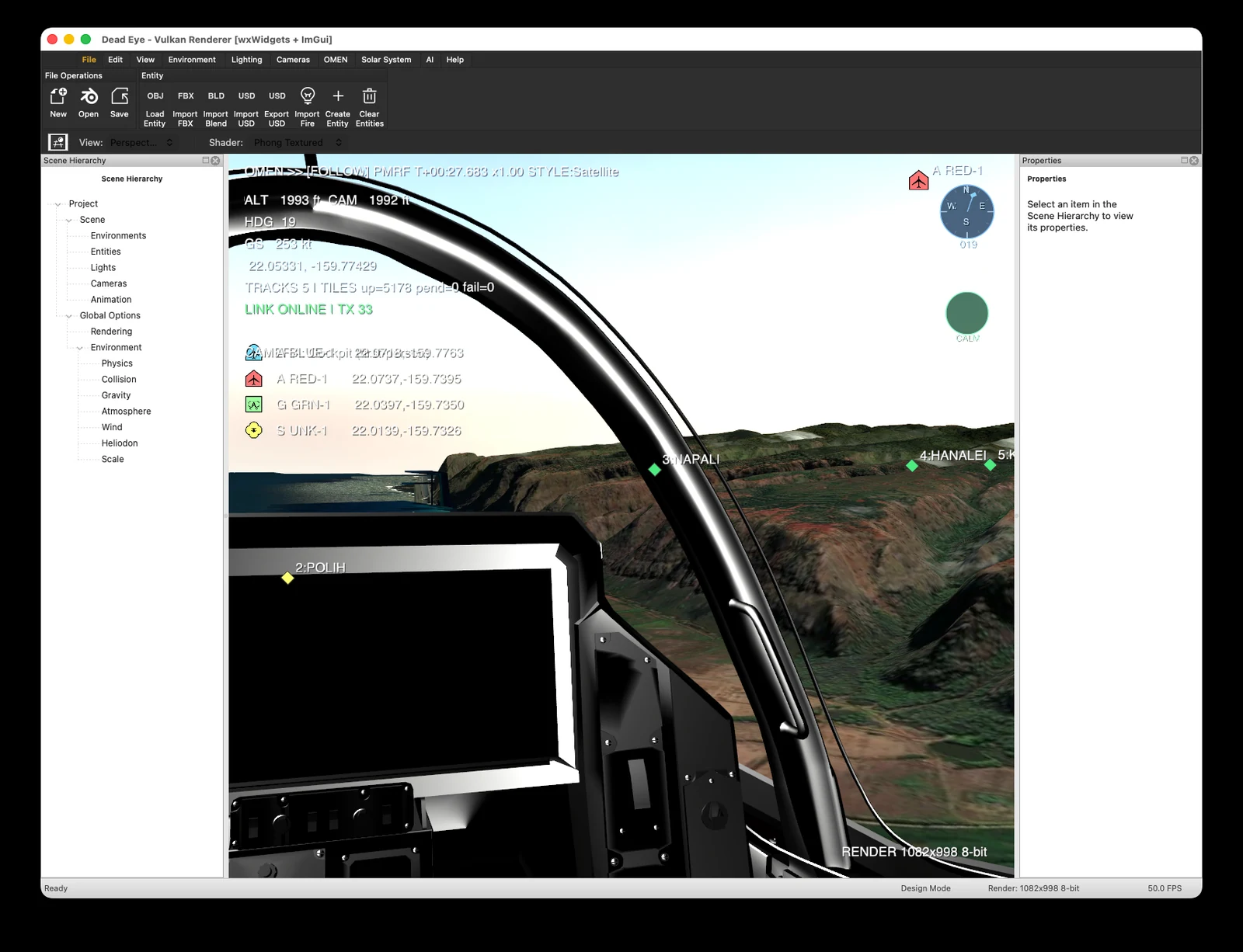
DeadEye™ running a cockpit view over meshed terrain with live tracks and a data link active.
Inside the Application
DeadEye™ is a complete desktop simulation environment, not a viewer or a plugin. Roughly 100,000 lines of first-party C++17 against a custom Vulkan pipeline, with no external engine dependency. It runs as a single process on macOS and Linux.
Scene and Entity Model
A project tree organizes environments, entities, lights, cameras, and animation, with a properties inspector bound to whatever is selected. Entities are created in the application or loaded from disk, and the whole scene saves and reloads as a project.
Environment Models
SRTM terrain elevation with bilinear sampling drives above-ground-level readout, terrain warnings and crash detection. Sun and moon positions come from the NREL solar position algorithm, arcsecond class, driving both lighting and the earth's sidereal rotation. Aerodynamic forces use a standard atmosphere and a constant wind vector.
Rendering Pipeline
Cook-Torrance physically based shading selectable against a Blinn-Phong path, shadow mapping with percentage-closer filtering where terrain both casts and receives, and a full hardware ray tracing stage set with a path tracer and denoiser, falling back to software when the extension is unavailable.
Asset Pipeline and Plugin SDK
Full FBX import covering meshes, materials, hierarchy, skeletons, animation curves, lights and cameras, parseable from memory so an encrypted asset pack never touches disk. OBJ, Blender and USD readers build in when their dependencies are present. A versioned C plugin interface exposes tracks, markers and the heads-up display to third-party modules.
Timeline and Playback
A full transport with play, pause, step, and scrub, plus adjustable time scaling and a running engagement clock. Any moment in a run can be returned to and replayed, which is how a decision gets examined after the fact.
Tracks and Data Link
Cursor on Target inbound over UDP multicast and TCP, outbound to a multicast group or a TAK server, with a hand-rolled parser and no XML dependency. Two-way exchange with an Anduril Lattice environment over its entities API, both directions validated against a live environment. Remote tracks are displayed, not simulated.
Cameras and Views
Perspective and follow cameras that attach to any entity in the scene, from an out-the-canopy cockpit view to a pulled-back tactical overview, with a heading indicator and altitude, ground speed, and geodetic position on the heads-up display.
Geospatial and Mapping
The most complete subsystem in the engine. Mapbox vector tile decoding with six styles that swap without re-fetching, a parallel satellite raster pipeline, terrain meshes from encoded elevation tiles, and DAFIF aeronautical tables for airports, runways, navaids and special-use airspace, plus FAA notices and KML or GeoJSON overlays.
Design and Simulation Modes
Build and instrument a scenario in design mode, then commit it to simulation mode and run. The same models drive both, so what you configured is what executes.
Distribution and Eligibility
DeadEye™ is defense simulation software. It is not offered as a public download, and we review every request before releasing a build. Requests from government program offices, prime contractors, subcontractors on a relevant effort, and academic partners are all welcome.
Access may be subject to United States export control regulations, including the International Traffic in Arms Regulations and the Export Administration Regulations. We ask for your country of citizenship so we can determine what applies. We do not release builds where we cannot establish eligibility.
DeadEye™ builds and runs on macOS and Linux. There is no Windows build. It needs a Vulkan-capable GPU, and the hardware ray tracing path needs the ray tracing extension, falling back to software where that is unavailable. Specific build availability and licensing terms are confirmed in our response, since they depend on what you intend to do with it.
Request Access
Required fields are marked. The more you can tell us about the intended use, the faster we can route the request.
Questions before you submit? Email questions@missileexperts.com or call (928) 241-4874.